
Scaling Odoo 19 for production demands reliability, security, and performance. This guide covers deployment on an Ubuntu 22.04 cloud server (e.g., AWS EC2, DigitalOcean Droplet) using source install, Nginx reverse proxy, and SSL. Assume a fresh server with 4GB+ RAM—setup time: 60-90 minutes.
Prerequisites
- Cloud Server: Ubuntu 22.04, accessible via SSH.
- Domain: Pointed to server IP.
- Firewall: Allow ports 80, 443, 22.
- Update system:
sudo apt update && sudo apt upgrade -y
Installing Postgresql
Odoo uses PostgreSQL for databases.
- Install:
>> sudo apt install postgresql -y
2. Start and enable:
>> sudo systemctl start postgresql

>> sudo systemctl enable postgresql
3. Create "odoo" postgres user:
>> sudo -u postgres createuser --createdb --username postgres --no-createrole --no-superuser --pwprompt odoo

Install Python and Dependencies
Odoo 19 needs Python 3.10+ preferably 3.12 atleast.
- Install Python and Dependencies:
>> sudo apt install python3-pip python3-dev python3-venv libxml2-dev libxslt1-dev libldap2-dev libsasl2-dev libtiff5-dev libjpeg8-dev libopenjp2-7-dev zlib1g-dev libpq-dev liblcms2-dev libblas-dev libatlas-base-dev -y

>> pip install --upgrade pip virtualenv
Install wkhtmltopdf
Odoo 19 needs wkhtmltopdf 0.12.6 to print PDF reports.
- Install Python and Dependencies:
>> sudo apt-get update && sudo apt-get install wkhtmltopdf -y
2. Verify the installation
>> wkhtmltopdf --version
Create User and Clone Source
- Create a New User odoo
>> sudo adduser odoo
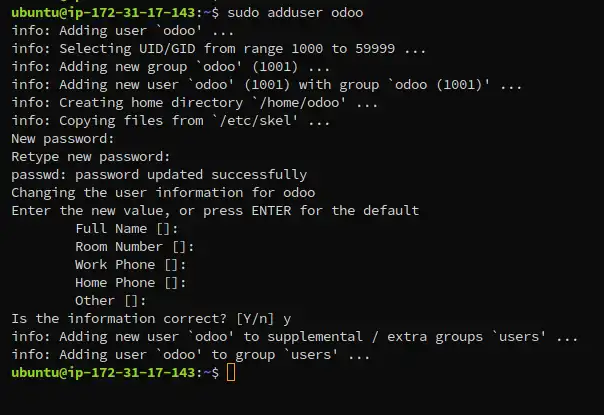
2. Change to user Odoo
>> su odoo
3. Clone the Odoo
>> git clone https://github.com/odoo/odoo --depth 1 --branch 19.0
4. Create and activate python virtual environment
>> python3 -m venv venv

>> source venv/bin/activate
5. Install python dependencies
>> pip install -r odoo/requirements.txt

>> exit
Configure Odoo for Production
- Create /etc/odoo/odoo.conf
[options]
; This is the password that allows database operations:
admin_passwd = very-secure-password
db_host = localhost
db_port = 5432
db_user = odoo
db_password = db-secure-password
addons_path = /home/odoo/odoo/addons,/home/odoo/odoo/custom_addons
default_productivity_apps = True
proxy_mode = True
2. Secure the conf file
>> sudo chown odoo:odoo /etc/odoo/odoo.conf && sudo chmod 640 /etc/odoo/odoo.conf
Set Up systemd Service
- Create /etc/systemd/system/odoo.service
[Unit]
Description=Odoo server
After=network.target postgresql.service

[Service]
ExecStart=/home/odoo/odoo/venv/bin/python odoo-bin -c /etc/odoo/odoo.conf
WorkingDirectory=/home/odoo/odoo
StandardOutput=inherit
StandardError=inherit
Restart=always
User=odoo

[Install]
WantedBy=multi-user.target
2. Enable the service
>> sudo systemctl daemon-reload

>> sudo systemctl enable odoo

>> sudo systemctl start odoo
Configure Nginx Reverse Proxy
- Install Nginx
>> sudo apt install nginx -y
2. Create /etc/nginx/sites-available/odoo
upstream odoo_web {
    server 127.0.0.1:8069;
}

upstream odoo_longpolling {
    server 127.0.0.1:8072;
}

# --- WebSocket Upgrade Map (CRITICAL) ---
map $http_upgrade $connection_upgrade {
    default upgrade;
    ''      close;
}

server {
    listen 80;
    server_name example.com www.example.com;

    # Performance tuning
    proxy_read_timeout 720s;
    proxy_connect_timeout 720s;
    proxy_send_timeout 720s;

    # Main Odoo app
    location / {
        proxy_pass http://odoo_web;
        proxy_redirect off;
        proxy_set_header Host $host;
        proxy_set_header X-Real-IP $remote_addr;
        proxy_set_header X-Forwarded-For $proxy_add_x_forwarded_for;
        proxy_set_header X-Forwarded-Proto $scheme;
    }

    # === WebSocket (MODERN REAL-TIME - REQUIRED) ===
    location /websocket {
        proxy_pass http://odoo_longpolling;
        proxy_http_version 1.1;
        proxy_set_header Upgrade $http_upgrade;
        proxy_set_header Connection $connection_upgrade;
        proxy_set_header Host $host;
        proxy_set_header X-Real-IP $remote_addr;
        proxy_set_header X-Forwarded-For $proxy_add_x_forwarded_for;
        proxy_set_header X-Forwarded-Proto $scheme;
        proxy_read_timeout 86400s;
        proxy_send_timeout 86400s;
    }

    # === Legacy Longpolling (keep for older Odoo or fallback) ===
    location /longpolling {
        proxy_pass http://odoo_longpolling;
        proxy_read_timeout 720s;
    }

    # Static content (cached)
    location ~* /web/static/ {
        proxy_cache_valid 200 90m;
        proxy_buffering on;
        expires 864000;
        proxy_pass http://odoo_web;
    }
}
Replace example.com with your domain name
3. Create soft link for odoo nginx configuration and enable it
>> sudo ln -s /etc/nginx/sites-available/odoo /etc/nginx/sites-enabled/

>> sudo nginx -t

>> sudo systemctl restart nginx

Add SSL with Let's Encrypt
- Install Certbot and use it to enable ssl on your site (replace yourdomain.com with your domain)
>> sudo apt install certbot python3-certbot-nginx -y

>> sudo certbot --nginx -d yourdomain.com
Security and Optimization
>> sudo ufw allow 443/tcp && sudo ufw enable # Firewall
2. Backups: Schedule pg_dump and file backups.
3. Your production Odoo 19 is live at https://yourdomain.com. Monitor logs and scale as needed.
More cloud tips at StraitCoders.com.